What Is the Lights Out Puzzle Online?
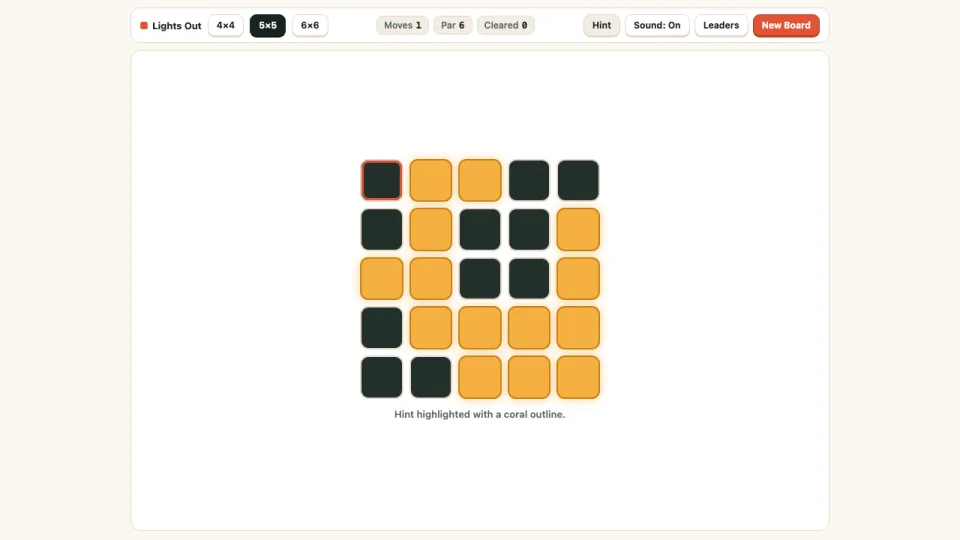
MindPomi's Lights Out puzzle online brings the classic electronic toggle-logic board straight to your browser—100% free, open-and-play in one tap, with no download or registration needed on phone or desktop. Every press flips the selected square together with its four orthogonal neighbors (above, below, left, and right), and your goal is to switch every amber light off in as few moves as possible.
Randomly scrambling cells on a 5×5 toggle grid frequently creates mathematically unsolvable boards, so MindPomi constructs every Lights Out puzzle online backward from an all-dark grid. That guarantees every 4×4, 5×5, and 6×6 puzzle has an exact solution within its displayed Par move count.
Designed for smooth mobile and desktop play alike, the stage loads on demand the instant you click Play, tracks your move count against Par, saves your total cleared boards automatically, and includes an exact GF(2) Hint highlight whenever you want to inspect the next optimal move.
How to Play Lights Out Puzzle Online
- Press Play Lights Out above to open the Lights Out puzzle online stage inside your browser tab—completely free with zero downloads or sign-ups.
- Select a 4×4, 5×5, or 6×6 board size in the HUD using mouse clicks or mobile touch taps.
- Click or tap any tile to flip both that square and its adjacent north, south, east, and west neighbors between amber (lit) and dark (off).
- Track your move count next to the Par benchmark as you work through the puzzle grid, or tap Hint to highlight a valid remaining toggle.
- Turn off the final amber light to clear the grid, advance your Cleared streak, and submit your efficiency score to the leaderboard.
Desktop & Mobile Controls
| Action | Desktop | Mobile / Tablet |
|---|---|---|
| Toggle tile & 4 neighbors | Left-click any cell on the grid | Tap any cell directly |
| Highlight a valid move | Click Hint in top HUD | Tap Hint button |
| Switch board size | Click 4×4, 5×5, or 6×6 in HUD | Tap 4×4, 5×5, or 6×6 tab |
Lights Out "Chase the Lights" Strategy Tips
- Use the "Chase the Lights" method: go row by row from top to bottom. Whenever a square in Row 1 is still lit, tap the square directly below it in Row 2—this turns off Row 1 without touching earlier tiles.
- Never click the same square twice in a single pass; in binary toggle arithmetic, pressing a tile twice equals pressing it zero times.
- Remember that order does not matter: if you discover a mistake on the bottom row, you only need to apply the remaining toggle set—you never have to backtrack in reverse order.
- Practice on 4×4 first to build intuition for how corner presses affect only 3 tiles, edge presses affect 4 tiles, and center presses affect 5 tiles.
Lights Out Player Questions
Do I need to download anything to play Lights Out?
No. Lights Out runs free in any desktop or mobile browser with zero downloads, zero registration, and instant board generation.
Why do my lights keep turning back on when I tap randomly?
Because toggling the same cell twice undoes that press completely, you should never press any cell more than once inside a clean solution—focus on chasing remaining amber lights down row by row.
Are my Lights Out clears saved?
Yes. MindPomi Lights Out saves your total cleared boards and posts your highest efficiency scores under your anonymous player cookie.
Lights Out FAQ
Is every Lights Out puzzle guaranteed to be solvable?
Yes. Every board in MindPomi Lights Out is constructed backward from an all-dark grid using valid toggle presses, which mathematically guarantees a solution exists in Par moves or fewer.
What does the Hint button do in Lights Out?
Hint outlines one exact remaining toggle square in persimmon coral right on the grid so you can see the next valid move without getting stuck.
Does the order of clicks matter in Lights Out?
No. Click order never matters in Lights Out, and pressing the same tile twice cancels itself out completely—only the set of tiles toggled an odd number of times counts.
Can I change grid size in Lights Out?
Yes. Switch between 4×4 (starter), 5×5 (classic), and 6×6 (expert) directly in the top HUD at any time.
Player Notes & Scores
0No notes yet — beat Par on the 5×5 or 6×6 amber grid without using a hint? Drop your fewest-moves record below.