What Is MindPomi's Stroop Test Online?
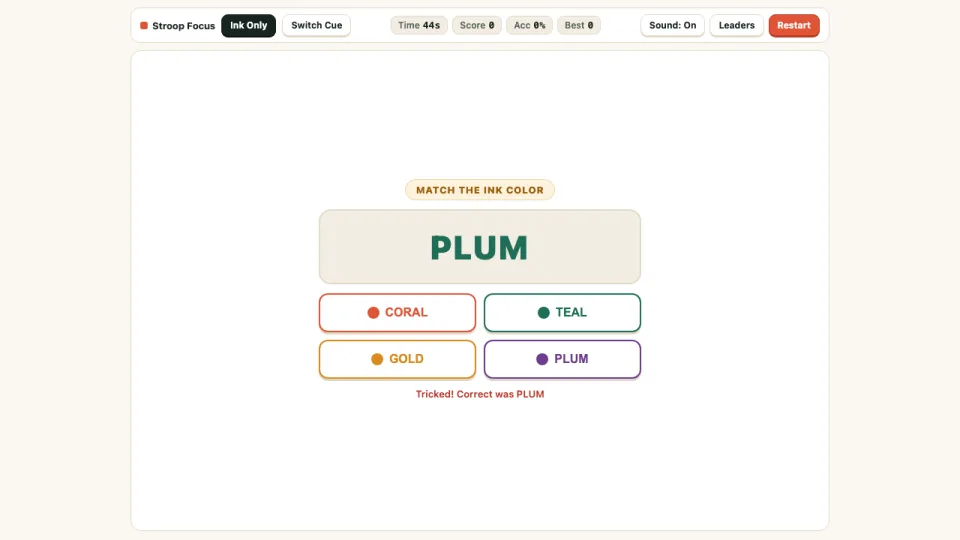
Take an interactive Stroop test online free at MindPomi—built to open instantly in your browser on desktop or mobile phones with zero downloads, zero logins, and clear button labels alongside color dots. Based on the classic psychology Stroop color-word interference experiment, a color word like "CORAL" or "PLUM" flashes in mismatched ink, challenging your selective attention to respond accurately in under half a second.
Beyond standard drills, our free Stroop test online gives you two dedicated HUD tracks: Ink Only measures pure inhibition where you always tap the ink color, while Switch Cue alternates dynamically between "Match the INK COLOR" and "Match the WRITTEN WORD" to test rapid executive task switching.
Every 45-second sprint records your exact reaction latency in milliseconds, computes overall accuracy %, rewards consistent speed streaks, and lets you benchmark improvement immediately after every round.
How to Take the Stroop Test Online
- Click Play Stroop Focus above to start the Stroop test online inside your current browser window—free, instant, and playable without downloads on phone or computer.
- Pick Ink Only mode (classic ink naming) or Switch Cue mode (alternating ink vs. written word rules) in the top HUD.
- Check the cue prompt above the stimulus card, then click or tap the matching CORAL, TEAL, GOLD, or PLUM button below.
- Respond briskly without blind guessing while running this Stroop test online—accurate speed builds speed points and your streak multiplier.
- Finish the 45-second timer to inspect your accuracy percentage, average reaction time in milliseconds, and leaderboard score.
Desktop & Mobile Controls
| Action | Desktop | Mobile / Tablet |
|---|---|---|
| Select matching color button | Click CORAL, TEAL, GOLD, or PLUM button | Tap the matching color button |
| Toggle Ink Only vs. Switch Cue | Click Ink Only or Switch Cue in top HUD | Tap Ink Only or Switch Cue tab |
| Restart 45s sprint | Click Restart in HUD | Tap Restart button |
Tips to Beat Stroop Interference
- Keep your gaze near the first letter or color border rather than scanning across the entire word—this weakens automatic word reading during Ink Only runs.
- In Switch Cue mode, read the top pill ("INK COLOR" vs. "WRITTEN WORD") first on every single trial before looking down at the center word.
- Consistent streaks build big point totals: a 500ms accurate tap beats a 300ms misclick that drops your streak bonus back to zero.
- Warm up with two rounds of Ink Only before switching to Switch Cue to feel the cognitive task-switching cost clearly.
Stroop Focus Player Questions
Can I play Stroop Focus on my phone?
Yes. Stroop Focus fits cleanly on mobile screens with four wide, high-contrast color buttons right below the prompt card and requires no app install or login.
How can I improve my Stroop Focus reaction time?
In Ink Only mode, squint slightly or focus on the outer edge of a letter rather than reading the whole word—reducing semantic reading interference noticeably speeds up ink identification.
Are my Stroop Focus scores saved?
Yes. Your personal best score saves automatically in your browser and submits to the MindPomi Stroop Focus leaderboard after each 45-second sprint.
Stroop Focus FAQ
Why is the Stroop test tricky even though the rules are simple?
The Stroop effect happens because your brain reads written words automatically faster than it names ink colors. When the word "PLUM" is printed in GOLD ink, your brain has to actively suppress the reading reflex to name the ink color.
What is the difference between Ink Only and Switch Cue mode?
In Ink Only mode, you always tap the ink color of the printed word. In Switch Cue mode, the banner above each stimulus alternates between "Match the INK COLOR" and "Match the WRITTEN WORD," testing cognitive flexibility as well as inhibition.
Does Stroop Focus measure my reaction time in milliseconds?
Yes. Stroop Focus calculates both your overall accuracy percentage and your average reaction latency in milliseconds across all 45 seconds of trials.
Is Stroop Focus free and accessible in any browser?
Yes. Each of the four response buttons displays both its colored dot and text label so you can respond accurately without guesswork.
Player Notes & Scores
0No notes yet — how fast is your average millisecond reaction time in Switch Cue mode? Post your ms score and accuracy below.